Antica: A Playful, Color-Ready Geometric Font for Real Creative Workflows
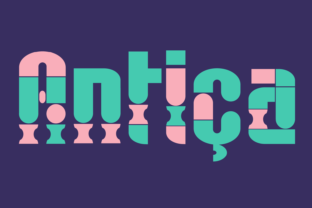
Antica isn’t just another display font—it’s a deliberate tool built for creators who need visual energy without sacrificing precision. Designed from the ground up using clean geometric forms, Antica comes in three distinct weights: Regular, Alternative, and Bold. Each weight maintains consistent proportions and spacing while offering subtle but meaningful shifts in character structure and personality. The “Alternative” weight, for example, introduces playful glyph variations—like rounded terminals or asymmetrical counters—that add expressive flexibility without breaking typographic harmony. This isn’t decorative flair for its own sake; it’s functional variation meant to support hierarchy, tone, and intention across real projects.
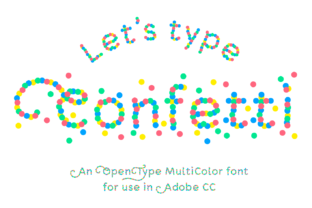
What sets Antica apart is its native color support. It’s an OpenType-SVG font—meaning color, gradients, and layered effects are embedded directly into each glyph. That makes it ideal for designers who want rich, editable text that behaves like vector art but types like real text. You’ll see immediate results in Photoshop and Illustrator when you apply layer styles or adjust blending modes. In Silhouette Studio and Inkscape, Antica renders as scalable, editable shapes with full color fidelity—no rasterization, no manual recoloring, no lost detail.
Where Antica Fits in Your Workflow
Antica works best when integrated early—not as an afterthought, but as part of your planning and asset selection phase. If you’re designing a social media campaign, launching a product, or building a brand identity system, choosing Antica at the outset helps align visual tone with messaging strategy. Its geometric foundation supports clarity and modernity, while its color-ready nature allows you to lock in palette relationships before finalizing layouts. That saves time later: no need to convert text to outlines and manually recolor dozens of assets.
During execution, Antica shines in tools where live text editing matters. In Illustrator, you can adjust tracking, baseline shift, or vertical scale—and the colors and SVG layers adapt responsively. In Photoshop, it stays fully editable even after applying masks or smart filters. That means iterative refinement stays fast: tweak a headline’s weight from Regular to Bold, swap in the Alternative version for a subhead, and adjust hue values across all glyphs using adjustment layers—all without losing editability.
Compatibility: Know What Works (and What Doesn’t)
Antica ships with OTF and TTF files—but those are fallbacks, not primary assets. They contain only monochrome outlines and lack color data. Use them only when SVG support isn’t available, such as in basic word processors or older design apps. For full functionality, rely on the OpenType-SVG version.
Here’s what works reliably:
- Adobe Photoshop (CC 2017+): Full color rendering, live text editing, and compatibility with layer effects.
- Adobe Illustrator (CC 2018+): Editable glyphs with preserved color, path manipulation, and export to SVG/PDF without flattening.
- Silhouette Studio (v5.0+, Business Edition recommended): Supports SVG fonts natively—ideal for crafters and small-batch producers needing vibrant, cut-ready text.
- Inkscape (v1.1+): Renders color correctly and allows direct node editing of individual glyphs.
Important note: Antica is not compatible with Cricut Design Space. The Cricut platform doesn’t support OpenType-SVG fonts, and converting Antica to outlines often breaks color layers or introduces rendering inconsistencies. If your workflow includes Cricut, plan accordingly—either use Antica earlier in the design phase (e.g., in Illustrator), then export flattened assets, or choose a compatible alternative for final cut files.
Practical Integration Tips
Start small. Before committing Antica to a full brand system, test it in one high-impact context—like a presentation title slide, Instagram story template, or email header. That reveals how its geometry holds up at different sizes and how its color behavior interacts with your background choices. Pay attention to contrast: Antica’s bold weight carries strong presence, but its Regular version benefits from generous line height and spacing in body copy applications.
Use the three weights intentionally—not just for size variation, but for semantic distinction. Try this pattern: Regular for descriptive captions, Alternative for interactive elements (like buttons or callouts), and Bold for primary headlines. This builds rhythm and improves scannability without relying solely on color or layout tricks.
When collaborating, share the OpenType-SVG file—not just screenshots or PDFs. That ensures teammates working in supported apps get the full experience. Include a quick note about usage expectations: e.g., “Use the SVG version in Illustrator; avoid pasting into PowerPoint unless converted to outlines.” Clear, specific guidance prevents version mismatches and preserves quality across handoffs.
Long-Term Usability Considerations
Antica’s geometric consistency makes it highly reusable across projects—especially if your work spans digital and print. Because its forms are built on predictable proportions, scaling it from mobile UI text to large-format signage introduces minimal distortion. Just verify color profiles: RGB for screen, CMYK for print. While Antica’s SVG layers render in RGB by default, Illustrator lets you convert fills to process colors or spot inks before exporting for press.
For educators or content creators building reusable templates, Antica’s Alternative weight offers built-in variation that reduces visual fatigue. Instead of duplicating a template and manually adjusting letters for “freshness,” you can switch weights and instantly refresh tone. That supports consistency over time while keeping output feeling dynamic.
One underused strength? Antica works well in accessibility-conscious contexts—if used thoughtfully. Its clean geometry improves legibility at small sizes, and its color layers can reinforce meaning (e.g., green checkmarks, red error states) without relying solely on hue. Pair it with sufficient contrast ratios and avoid using color alone to convey critical information.
Workflow Examples Across Roles
Freelance marketers use Antica to build swipeable pitch decks: Bold for section headers, Regular for value propositions, and Alternative for client testimonials—each styled with brand-aligned colors that update globally via swatches. That keeps revisions fast and on-brand.
Educators designing digital worksheets embed Antica in Canva or Google Slides (via SVG export + image insertion), using its geometric clarity to highlight vocabulary terms or math symbols. The visual distinction helps learners parse information faster than standard sans-serifs.
Small business owners creating seasonal promotions drop Antica into Silhouette Studio to generate layered vinyl decals—keeping text fully editable until the final cut step. No need to pre-render or guess spacing; adjustments happen in real time, even after importing background graphics.
None of these uses require mastering new software. They rely instead on recognizing where Antica’s strengths—geometric reliability, color integration, and weight-based expressiveness—solve actual bottlenecks: inconsistent branding, slow iteration, or flat-looking deliverables.
Antica doesn’t replace foundational typography skills. It extends them. Its value emerges not in isolation, but in how cleanly it connects to your existing tools, timelines, and team habits. When you choose it early, use it deliberately, and respect its technical boundaries, it becomes less of a “font pick” and more of a quiet efficiency multiplier—one that adds color, clarity, and character without demanding extra steps.