Confetti: A Colorful, Pointy Font That Pops
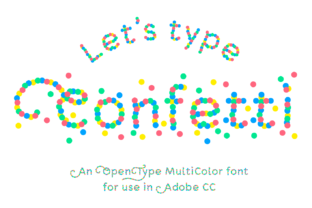
If you’ve ever scrolled past a social post, flyer, or digital greeting and paused—just for a second—because the text looked like it was celebrating, you’ve felt the quiet power of expressive typography. Confetti isn’t just another decorative font. It’s a vibrant, color-rich OpenType-SVG typeface designed to inject instant energy into your work—without requiring illustration skills or layered effects.
At its core, Confetti is a playful yet precise font inspired by real confetti: sharp-edged, saturated, and full of movement. Each glyph is hand-crafted with intentional pointiness and chromatic variation—no two letters look exactly alike in tone or texture. That’s not randomness; it’s thoughtful design. The result? Text that feels spontaneous and joyful, but still legible, balanced, and professional enough for real-world use.
Why Confetti Stands Out in Your Toolkit
Most display fonts rely on outlines, shadows, or manual coloring to suggest personality. Confetti skips the workaround. As a native color font (OpenType-SVG), it renders full-color glyphs directly in supported apps—no extra steps, no rasterization, no guesswork. You type, and it delivers rich, scalable color instantly.
This makes Confetti especially valuable when time matters: designing last-minute event graphics, updating classroom materials before bell rings, or launching a limited-time promo across multiple platforms. There’s no need to duplicate layers, apply gradients, or export PNGs just to get color. What you see in the character panel is what prints—or displays—on screen.
Where Confetti Fits Naturally
Confetti shines where warmth, clarity, and visual impact intersect. Here’s how creators across fields are using it—practically and effectively:
- Marketing & Social Media: Use Confetti for Instagram story headers, email subject lines, or banner ads where attention spans are short and differentiation is critical. Its built-in color and shape help your message stand out in crowded feeds—without needing custom illustrations.
- Educational Materials: Teachers use Confetti for bulletin board titles, worksheet headers, and digital learning slides. Its high contrast and cheerful tone reduce cognitive load for younger learners while keeping content approachable for adults in training modules.
- Small Business Branding: Local bakeries, craft studios, and boutique service providers integrate Confetti into seasonal signage, packaging accents, and website hero text. It adds handmade charm without sacrificing polish—especially effective when paired with clean sans-serifs for body copy.
- Digital Publishing & Blogging: Newsletter banners, ebook chapter openers, and blog post highlights gain visual rhythm with Confetti. Because it scales cleanly at any size—and retains color fidelity—it works equally well on mobile previews and desktop layouts.
- Event Design: From wedding invitations to conference schedules, Confetti adds celebratory nuance without cliché. Try it for “RSVP,” “Join Us,” or date callouts—where tone matters as much as information.
What Works—and What Doesn’t
Confetti thrives in environments that support OpenType-SVG natively. That includes Adobe Photoshop (CC 2017+), Illustrator (CC 2018+), Silhouette Studio (v5.0+), and Inkscape (1.1+). In those apps, it behaves like any other font—you select it, type, adjust size or tracking, and go.
But be mindful: the included OTF and TTF files are not compatible with Cricut Design Space. Those versions exist only for legacy fallback or basic preview—not for cutting or vinyl projects. If your workflow relies heavily on Cricut, Confetti won’t serve that purpose. Instead, consider it for digital-first or print-based outputs where color integrity and typographic flair matter most.
Also worth noting: Confetti is a display font—not a text face. Avoid long paragraphs or dense captions. Reserve it for headlines, labels, short quotes, buttons, and decorative accents. Pair it thoughtfully: neutral sans-serifs (like Inter or Montserrat) or soft serifs (such as Lora or Merriweather) create strong contrast without competing for attention.
A Few Real-World Tips
Start small. Try Confetti on a single word in a mockup—“Celebrate,” “New,” or “You’re Invited”—and observe how it shifts the mood. Does it feel lighter? More urgent? More inclusive? Typography influences perception more than many realize.
Test readability early. While Confetti is highly legible at medium-to-large sizes, tight spacing or low-resolution exports can blur its pointy details. Always preview at actual usage size—especially for web banners or printed posters viewed from a distance.
Respect context. A bold, colorful font like Confetti may energize a kids’ summer camp flyer—but could feel incongruous in a legal disclaimer or medical brochure. Match tone to audience expectation, not just aesthetic preference.
Getting the Most From Confetti
Because Confetti is color-native, you don’t need to pre-select swatches or manage layer order. But you can adjust its appearance meaningfully: in Illustrator, use the Appearance panel to add subtle strokes or opacity tweaks; in Photoshop, apply blending modes non-destructively. In Silhouette, it cuts cleanly as a vector outline when used with “Print then Cut” workflows—just remember to convert to paths if exporting for older software versions.
For educators and freelancers juggling multiple clients or projects, Confetti reduces reliance on stock graphics or custom lettering. One license covers unlimited personal and commercial use—so whether you’re designing a client’s product launch or printing birthday cards for your niece, it scales ethically and economically.
And because it’s built on OpenType-SVG standards—not proprietary formats—it’s future-forward. As more apps adopt native color font support (including upcoming versions of Figma and Affinity apps), Confetti stays relevant without needing updates or conversions.
In a landscape where generic fonts blend together and custom illustration takes time, Confetti offers something rare: immediacy with intention. It doesn’t shout. It sparkles—clearly, consistently, and with purpose. Whether you’re launching a side hustle, preparing a lesson plan, or refreshing your brand’s visual voice, Confetti gives you a shortcut to feeling finished—without skipping the craft.